

Use the CellVAlignment property to specify the vertically alignment for the cell's caption. Use the CellSingleLine property to specify whether a cell uses single or multiple lines. Use the CellHAlignment property to align horizontally the cell. The +/- button is aligned accordingly to the cell's caption. Use the Def(exCellVAlignment) property to specify the same vertical alignment for the entire column.
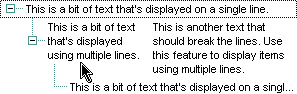
The following VB sample aligns the focused cell to the bottom:
With Gantt1.Items
    .CellVAlignment(.FocusItem, 0) = VAlignmentEnum.BottomAlignment
End With
The following C++ sample right aligns the focused cell:
#include "Items.h"
CItems items = m_gantt.GetItems();
items.SetCellVAlignment( COleVariant( items.GetFocusItem() ), COleVariant( (long)0 ), 2 /*BottomAlignment*/ );
The following VB.NET sample right aligns the focused cell:
With AxGantt1.Items
    .CellVAlignment(.FocusItem, 0) = EXGANTTLib.VAlignmentEnum.BottomAlignment
End With
The following C# sample right aligns the focused cell:
axGantt1.Items.set_CellVAlignment(axGantt1.Items.FocusItem, 0, EXGANTTLib.VAlignmentEnum.BottomAlignment);
The following VFP sample right aligns the focused cell:
with thisform.Gantt1.Items
	.DefaultItem = .FocusItem
	.CellVAlignment(0,0) = 2 && BottomAlignment
endwith