

 If the Name parameter doesn't include a : or % character
the Add method adds a regular bar.
If the Name parameter doesn't include a : or % character
the Add method adds a regular bar.
 If the Name parameter includes a % character, so the Name
parameter is like A%B, the Add method adds a new bar that's a
combination of two existing bars A and B so the first bar A is displayed
on the full area of the bar, since the second bar B uses the ItemBar(,,exBarPercent)
value to determine the percent of the area from the full bar to be
painted. Use the ItemBar(,,exBarShowPercentCaption)/ItemBar(,,exBarPercentCaptionFormat)
to show and format the percent value as text. For instance, the Add("Task%Progress") adds a
combination of Task
and Progress
If the Name parameter includes a % character, so the Name
parameter is like A%B, the Add method adds a new bar that's a
combination of two existing bars A and B so the first bar A is displayed
on the full area of the bar, since the second bar B uses the ItemBar(,,exBarPercent)
value to determine the percent of the area from the full bar to be
painted. Use the ItemBar(,,exBarShowPercentCaption)/ItemBar(,,exBarPercentCaptionFormat)
to show and format the percent value as text. For instance, the Add("Task%Progress") adds a
combination of Task
and Progress  bars, so the Task shape is displayed on the full bar, and the Progress
shape is displayed only on the portion determined by the
Items.ItemBar(,,exBarPercent) value. The A and B could be any known bar at
the adding time. For instance, if you have added bars like "MyTask"
and "MySplit" you can define the bar "MyTask%MySplit",
and so on. This option helps you to display proportionally the second
shape when the user resizes or moves the bar.
bars, so the Task shape is displayed on the full bar, and the Progress
shape is displayed only on the portion determined by the
Items.ItemBar(,,exBarPercent) value. The A and B could be any known bar at
the adding time. For instance, if you have added bars like "MyTask"
and "MySplit" you can define the bar "MyTask%MySplit",
and so on. This option helps you to display proportionally the second
shape when the user resizes or moves the bar.
 If the Name parameter includes a : character, so the Name
parameter is like A:B, the newly created bar indicates a
combination of A and B bars, where A is displayed in the working areas,
since the B bar is displayed in non-working areas. Use the NonworkingDays
or NonworkingHours property to
define non-working days or hours. Use the AddNonworkingDate
method to add custom dates as being nonworking date. For instance, the
Add("Task:Split") property adds a combination of Task
and Split
If the Name parameter includes a : character, so the Name
parameter is like A:B, the newly created bar indicates a
combination of A and B bars, where A is displayed in the working areas,
since the B bar is displayed in non-working areas. Use the NonworkingDays
or NonworkingHours property to
define non-working days or hours. Use the AddNonworkingDate
method to add custom dates as being nonworking date. For instance, the
Add("Task:Split") property adds a combination of Task
and Split  bars, so the Task bar is displayed in working area, and the Split bar is
displayed in the non-working area. In other words you have a Task bar that
's interrupted for each non-working unit. For instance, "Task:Progress"
adds a new bar that displays the Task shape in working areas, and the
Progress shape in non-working area. The A and B could be any known bar at
the adding time. For instance, if you have added bars like "MyTask"
and "MySplit" you can define the bar "MyTask:MySplit",
and so on.
bars, so the Task bar is displayed in working area, and the Split bar is
displayed in the non-working area. In other words you have a Task bar that
's interrupted for each non-working unit. For instance, "Task:Progress"
adds a new bar that displays the Task shape in working areas, and the
Progress shape in non-working area. The A and B could be any known bar at
the adding time. For instance, if you have added bars like "MyTask"
and "MySplit" you can define the bar "MyTask:MySplit",
and so on.
 If the Name parameter includes % and : characters, so
it's like A%B:C it combines the cases 2 and 3.
If the Name parameter includes % and : characters, so
it's like A%B:C it combines the cases 2 and 3.
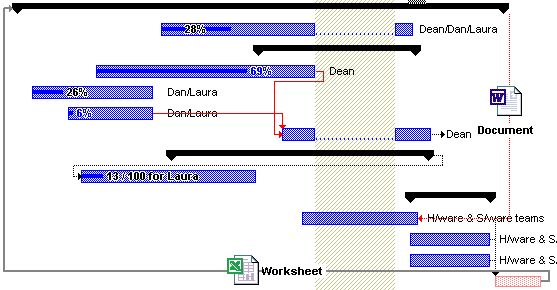
By default, the Bars collection includes the following predefined bars:
- "Deadline":

- "Project Summary":

- "Summary":

- "Milestone":

- "Progress":
- "Split":
- "Task":
The following VB sample adds a custom shape  and defines a bar like this
  :
:
With Gantt1.Chart.Bars
    .AddShapeCorner 12345, 1
    With .Add("Task2")
        .Pattern = exPatternDot
        .Shape = exShapeThinDown
        .StartShape = 12345
        .StartColor = RGB(255, 0, 0)
        .Color = .StartColor
    End With
End With
The following C++ sample adds a custom shape and defines a bar like above:
CBars bars = m_gantt.GetChart().GetBars();
bars.AddShapeCorner( COleVariant( (long)12345 ), COleVariant( (long)1 ) );
CBar bar = bars.Add("Task2");
bar.SetPattern( 2 /*exPatternDot*/ );
bar.SetShape( 20 /*exShapeThinDown*/ );
bar.SetStartShape( 12345 );
bar.SetStartColor( RGB(255, 0, 0) );
bar.SetColor( bar.GetStartColor() );
The following VB.NET sample adds a custom shape and defines a bar like above:
With AxGantt1.Chart.Bars
    .AddShapeCorner(12345, 1)
    With .Add("Task2")
        .Pattern = EXGANTTLib.PatternEnum.exPatternDot
        .Shape = EXGANTTLib.ShapeBarEnum.exShapeThinDown
        .StartShape = 12345
        .StartColor = RGB(255, 0, 0)
        .Color = .StartColor
    End With
End With
The following C# sample adds a custom shape and defines a bar like above:
axGantt1.Chart.Bars.AddShapeCorner(12345, 1);
EXGANTTLib.Bar bar = axGantt1.Chart.Bars.Add("Task2");
bar.Pattern = EXGANTTLib.PatternEnum.exPatternDot;
bar.Shape = EXGANTTLib.ShapeBarEnum.exShapeThinDown;
bar.StartShape = (EXGANTTLib.ShapeCornerEnum)12345;
bar.StartColor = ToUInt32(Color.FromArgb(255, 0, 0));
bar.Color = bar.StartColor;
The following VFP sample adds a custom shape and defines a bar like above:
With thisform.Gantt1.Chart.Bars
	.AddShapeCorner(12345, 1)
	With .Add("Task2")
	    .Pattern = 2 && exPatternDot
	    .Shape = 20 && exShapeThinDown
	    .StartShape = 12345
	    .StartColor = RGB(255, 0, 0)
	    .Color = .StartColor
	EndWith
EndWith