

For instance, lets say that we have a drop down window with some information and we need to display other information in the control's label when the user selects an item. The sample adds two columns, one is displayed in the drop down window, and the second column ( hidden column ) is displayed on the control's label.
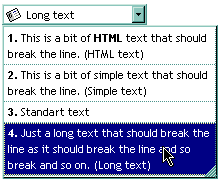
The VB sample looks like follows:
With ComboBox1
    .BeginUpdate

        .AdjustSearchColumn = False
        .SearchColumnIndex = 1
        .HeaderVisible = False
        .SingleEdit = True
        .ColumnAutoResize = True
        .ScrollBySingleLine = True
        .AllowSizeGrip = True
        .DrawGridLines = exAllLines
        .Alignment = LeftAlignment
        .WidthList = 216

        With .Columns.Add("Visible")
            .Def(exCellSingleLine) = False
        End With
        With .Columns.Add("Hidden")
            .Visible = False
        End With

        With .Items
            Dim h As HITEM
            h = .AddItem("1. This is a bit of HTML text that should break the line. (HTML text)")
            .CellCaptionFormat(h, 0) = exHTML
            .CellCaption(h, 1) = "HTML text"
            .CellImage(h, 1) = 1
            h = .AddItem("2. This is a bit of simple text that should break the line. (Simple text)")
            .CellCaptionFormat(h, 0) = exHTML
            .CellCaption(h, 1) = "Simple text"
            .CellImage(h, 1) = 2
            h = .AddItem("3. Standart text")
            .CellCaptionFormat(h, 0) = exHTML
            .CellCaption(h, 1) = "Standard text"
            .CellImage(h, 1) = 3
            h = .AddItem("4. Just a long text that should break the line as it should break the line and so break and so on. (Long text)")
            .CellCaptionFormat(h, 0) = exHTML
            .CellCaption(h, 1) = "Long text"
            .CellImage(h, 1) = 2
        End With

    .EndUpdate
End With
If we show the "Hidden" column like the sample looks like follows:
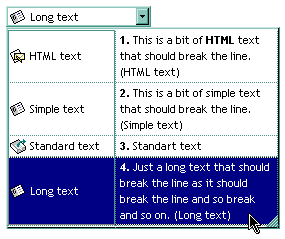
For instance you can use this feature if the Style property is DropDownList property to display an owner draw cell in the control's label area. Use the CellOwnerDraw property to draw a cell.
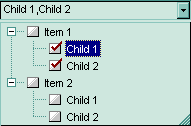
The following sample displays the list of items being checked separated by comma using the control's owner draw feature ( you are simulating a check list editor ):
Implements EXCOMBOBOXLibCtl.IOwnerDrawHandler
Option Explicit

Private Type RECT
    left As Long
    top As Long
    right As Long
    bottom As Long
End Type
Private Declare Function DrawText Lib "user32" Alias "DrawTextA" (ByVal hDC As Long, ByVal lpStr As String, ByVal nCount As Long, lpRect As RECT, ByVal wFormat As Long) As Long
Private Const DT_VCENTER = &H4

Private Sub Form_Load()

    With ComboBox1
        .HeaderVisible = False
        .Style = DropDownList
        .SingleEdit = True
        .AllowSizeGrip = True
        .ColumnAutoResize = True
        .AdjustSearchColumn = False
        .LinesAtRoot = exLinesAtRoot
        .IntegralHeight = True
        .FullRowSelect = False

        With .Columns
            .Add "Column 1"
            With .Add("owner draw column")
                .Visible = False
                ComboBox1.SearchColumnIndex = .Index
            End With
        End With

        With .Items
            Dim h As HITEM, hC As HITEM, i As Long
            For i = 1 To 2
                h = .AddItem("Item " & i)
                .CellHasCheckBox(h, 0) = True
                Set .CellOwnerDraw(h, 1) = Me
                hC = .InsertItem(h, , "Child 1")
                .CellHasCheckBox(hC, 0) = True
                Set .CellOwnerDraw(hC, 1) = Me
                hC = .InsertItem(h, , "Child 2")
                .CellHasCheckBox(hC, 0) = True
                Set .CellOwnerDraw(hC, 1) = Me
                .ExpandItem(h) = True
                If (i = 1) Then
                    .SelectItem(h) = True
                End If
            Next
        End With
    End With
End Sub

Private Sub IOwnerDrawHandler_DrawCell(ByVal hDC As Long, ByVal left As Long, ByVal top As Long, ByVal right As Long, ByVal bottom As Long, ByVal Item As Long, ByVal Column As Long, ByVal Source As Object)
        Dim rc As RECT
        With rc
            .left = left + 3
            .right = right
            .top = top
            .bottom = bottom
        End With
    Dim s As String
    s = ""
    With ComboBox1
        Dim i
        For Each i In .Items
            If (.Items.CellState(i, 0) = 1) Then
                s = s + IIf(Len(s) > 0, ",", "") + .Items.CellCaption(i, 0)
            End If
        Next
    End With
    DrawText hDC, s, Len(s), rc, DT_VCENTER
End Sub
The sample adds two columns. The hidden column is used to let user paint whatever he needs.
The following C++ sample adds two columns, and displays values from the hidden column when a new items is selected:
COleVariant vtMissing; V_VT( &vtMissing ) = VT_ERROR;
m_combobox.BeginUpdate();
m_combobox.SetAdjustSearchColumn( FALSE );
m_combobox.SetSearchColumnIndex( 1 );
m_combobox.SetHeaderVisible( FALSE );
m_combobox.SetSingleEdit( TRUE );
m_combobox.SetColumnAutoResize( TRUE );
m_combobox.SetScrollBySingleLine( TRUE );
m_combobox.SetAllowSizeGrip( TRUE );
m_combobox.SetDrawGridLines( 1 );
m_combobox.SetAlignment( 0 );
m_combobox.SetWidthList( vtMissing, 216 );

CColumns columns = m_combobox.GetColumns();
CColumn column1( V_DISPATCH( &columns.Add( "Visible" ) ) );
column1.SetDef( 16, COleVariant( VARIANT_FALSE ) );
CColumn column2( V_DISPATCH( &columns.Add( "Hidden" ) ) );
column2.SetVisible( FALSE );

CItems items = m_combobox.GetItems();
COleVariant vtSColumn(long(1)), vtItem = items.AddItem( COleVariant( "1. This item is shown in the drop down portion of the control. The second column displays information in the control's label." ) );
items.SetCellCaption( vtItem, vtSColumn, COleVariant( "Item 1" ) );
vtItem = items.AddItem( COleVariant( "2. This part is never shown in the control's label area." ) );
items.SetCellCaption( vtItem, vtSColumn, COleVariant( "Item 2" ) );
m_combobox.EndUpdate();
The following VB.NET sample adds two columns, and displays values from the hidden column when a new items is selected:
With AxComboBox1
    .BeginUpdate()
    .AdjustSearchColumn = False
    .SearchColumnIndex = 1
    .HeaderVisible = False
    .SingleEdit = True
    .ColumnAutoResize = True
    .ScrollBySingleLine = True
    .AllowSizeGrip = True
    .DrawGridLines = EXCOMBOBOXLib.GridLinesEnum.exAllLines
    .Alignment = EXCOMBOBOXLib.AlignmentEnum.LeftAlignment
    .set_WidthList(216)

    With .Columns.Add("Visible")
        .Def(EXCOMBOBOXLib.DefColumnEnum.exCellSingleLine) = False
        .Def(EXCOMBOBOXLib.DefColumnEnum.exCellCaptionFormat) = EXCOMBOBOXLib.CaptionFormatEnum.exHTML
    End With
    With .Columns.Add("Hidden")
        .Visible = False
    End With

    With .Items
        Dim h As Integer = .AddItem("1. This is a bit of HTML text that should break the line. (HTML text)")
        .CellCaption(h, 1) = "HTML text"
        .CellImage(h, 1) = 1
        h = .AddItem("2. This is a bit of simple text that should break the line. (Simple text)")
        .CellCaption(h, 1) = "Simple text"
        .CellImage(h, 1) = 2
        h = .AddItem("3. Standart text")
        .CellCaption(h, 1) = "Standard text"
        .CellImage(h, 1) = 3
        h = .AddItem("4. Just a long text that should break the line as it should break the line and so break and so on. (Long text)")
        .CellCaption(h, 1) = "Long text"
        .CellImage(h, 1) = 2
    End With
    .EndUpdate()
End With
The following C# sample adds two columns, and displays values from the hidden column when a new items is selected:
axComboBox1.BeginUpdate();
axComboBox1.AdjustSearchColumn = false;
axComboBox1.SearchColumnIndex = 1;
axComboBox1.HeaderVisible = false;
axComboBox1.SingleEdit = true;
axComboBox1.ColumnAutoResize = true;
axComboBox1.ScrollBySingleLine = true;
axComboBox1.AllowSizeGrip = true;
axComboBox1.DrawGridLines = EXCOMBOBOXLib.GridLinesEnum.exAllLines;
axComboBox1.Alignment = EXCOMBOBOXLib.AlignmentEnum.LeftAlignment;
axComboBox1.set_WidthList(216);

EXCOMBOBOXLib.Columns columns = axComboBox1.Columns;
EXCOMBOBOXLib.Column column = columns.Add("Visible") as EXCOMBOBOXLib.Column;
column.set_Def(EXCOMBOBOXLib.DefColumnEnum.exCellSingleLine, false);
column.set_Def(EXCOMBOBOXLib.DefColumnEnum.exCellCaptionFormat,EXCOMBOBOXLib.CaptionFormatEnum.exHTML);
column = columns.Add("Hidden") as EXCOMBOBOXLib.Column;
column.Visible = false;
EXCOMBOBOXLib.Items items = axComboBox1.Items;

int h = items.AddItem("1. This is a bit of HTML text that should break the line. (HTML text)");
items.set_CellCaption(h, 1, "HTML text" );
items.set_CellImage(h, 1, 1);
h = items.AddItem("2. This is a bit of simple text that should break the line. (Simple text)");
items.set_CellCaption(h, 1,"Simple text");
items.set_CellImage(h, 1, 2);
h = items.AddItem("3. Standart text");
items.set_CellCaption(h, 1,"Standard text");
items.set_CellImage(h, 1, 3);
h = items.AddItem("4. Just a long text that should break the line as it should break the line and so break and so on. (Long text)");
items.set_CellCaption(h, 1,"Long text");
items.set_CellImage(h, 1,2);
axComboBox1.EndUpdate();
The following VFP sample adds two columns, and displays values from the hidden column when a new items is selected:
With thisform.ComboBox1
    .BeginUpdate
        .AdjustSearchColumn = .f.
        .SearchColumnIndex = 1
        .HeaderVisible = .f.
        .SingleEdit = .t.
        .ColumnAutoResize = .f.
        .ScrollBySingleLine = .t.
        .AllowSizeGrip = .t.
        .DrawGridLines = 1 && exAllLines
        .Alignment = 0 && LeftAlignment
        .WidthList = 216

        With .Columns.Add("Visible")
            .Def(16) = .f. && exCellSingleLine
            .Def(17) = 1 && exHTML
        EndWith
        With .Columns.Add("Hidden")
            .Visible = .f.
        EndWith

        With .Items
            .DefaultItem = .AddItem("1. This is a bit of HTML text that should break the line. (HTML text)")
            .CellCaption(0, 1) = "HTML text"
            .CellImage(0, 1) = 1
            .DefaultItem = .AddItem("2. This is a bit of simple text that should break the line. (Simple text)")
            .CellCaption(0, 1) = "Simple text"
            .CellImage(0, 1) = 2
            .DefaultItem = .AddItem("3. Standart text")
            .CellCaption(0, 1) = "Standard text"
            .CellImage(0, 1) = 3
            h = .AddItem("4. Just a long text that should break the line as it should break the line and so break and so on. (Long text)")
            .CellCaption(0, 1) = "Long text"
            .CellImage(0, 1) = 2
        EndWith
    .EndUpdate
EndWith