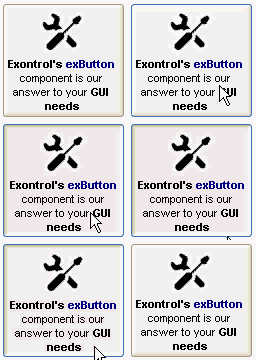
The following sample loads the picture from a file:
With Button1
    .Image = "D:\temp\icons\settings.gif"
End With
The following sample assigns the first icon from an ImageList control:
With Button1
    .Images ImageList1.hImageList
    .Image = 1
End With
The following sample assigns a Picture objects:
With Button1
    .Image = Picture1.Picture
End With
The following sample loads the picture from an BASE64 encoded string ( Use the eximages tool to save your picture as base64 encoded format )
The following sample displays the first icon in the Images collection:
With Button1
    .Images "gBJJgBAICAAGAAEAAQhYAf8Pf4hh0QihCJo2AEZjQAjEZFEaIEaEEaAIAkcbk0olUrlktl0vmExmUzmk1m03nE5nU7nk9n0/oFBoVDolFo1HpFJpVLplNp1PqFRqVTqlVq1XrFZrVbrldr1fsFhsVjslls1ntFptVrtltt1vuFxuVzul1u13vF5vV7vl9v1/wGBwWDwDAwwAwzAssQACAx2EuuJxGHyWSqmMyWYymHxyAyFoyubxWhxWMxlMzMPib/yej0WtxuPz9ey0a0mw02q3Osoma0uqy2ejPC2+zrO1jPI2Gp1md1fP3c95nP4PJw+N62K41Y50b5XT6PO53RnHT82cx/V2HbqeS7u29Ge6fj3X11nKnG+6HA1/Y4bsti4T2Ka273wA6LGPEx7yJ3BD7P2+7XuLAaqNu+aNQdCLtJ++bHwUzz6NY/T8Qoq8Mv9FEGJ890Fwe8MPRbDUSrJE8SKFEMIQDHMcRmtUVKTH7ownHsiSLI0jyKiwfJXJaPJAkSSAAkqUSm/LVSQmiKI2eZ/n43iMnAf54B+jZwB+cAHu8B5wAO7wBzYjZAADOCNTkYE2o2AZgAGlE9T5OoDz3MtAz+jJ8TXQoAH8B54USf5PnzNMMNOjKAg="
    .Image = 1
End With
All of the properties and methods for all objects in the Exontrol's exButton can be assigned at design time using the WYSWYG Template /Layout editor. Open the control in design mode, and select Properties from its context menu. The Template language uses the x-script language ( very simple ), that can be used to initializes the properties and methods at design time.
The following sample initializes the control's image and caption at design mode, using the Template page:
The button's visual appearance in this case will be: